
Download Fast Video Cutter – video cutter, fast video editor, cut video, video trimmer, free video tool, video editing app, quick video clip, video trimming tool
Overview
Fast Video Cutter is a streamlined mobile application designed for users seeking rapid, efficient video editing without the complexity of professional-grade software. Its primary purpose is to enable quick trimming and clipping of video segments directly from a smartphone, making it ideal for content creators, social media users, and casual viewers who need to extract specific moments from longer recordings. The app solves the common pain point of lengthy editing workflows by delivering high-speed video cutting with minimal user input. It is particularly beneficial for individuals who require on-the-go editing, such as influencers preparing clips for platforms like Instagram, TikTok, or YouTube Shorts, or students creating presentation highlights from lecture recordings.
Developed by Fast Tools, the app focuses on simplicity and performance, targeting users who value time efficiency and uncomplicated workflows. While specific details about the developer’s background are not available, the app’s clean functionality suggests a targeted approach to solving a niche but widespread need: fast, reliable video trimming. The app’s utility extends across personal and professional contexts, from sharing memorable moments to preparing multimedia content for digital distribution. In the current mobile app ecosystem, where video content dominates user engagement, Fast Video Cutter fills a vital gap by offering a lightweight, accessible tool that delivers immediate results without requiring technical expertise or significant device resources.
Key Features & Functionality
- Blazing Fast Speed: The app is engineered for rapid video processing, enabling users to cut clips in just seconds. This efficiency is ideal for users who need to edit multiple videos quickly or work under time constraints.
- High-Quality Output: Despite its speed, Fast Video Cutter maintains original video resolution and clarity, ensuring that trimmed clips remain sharp and visually consistent with the source material.
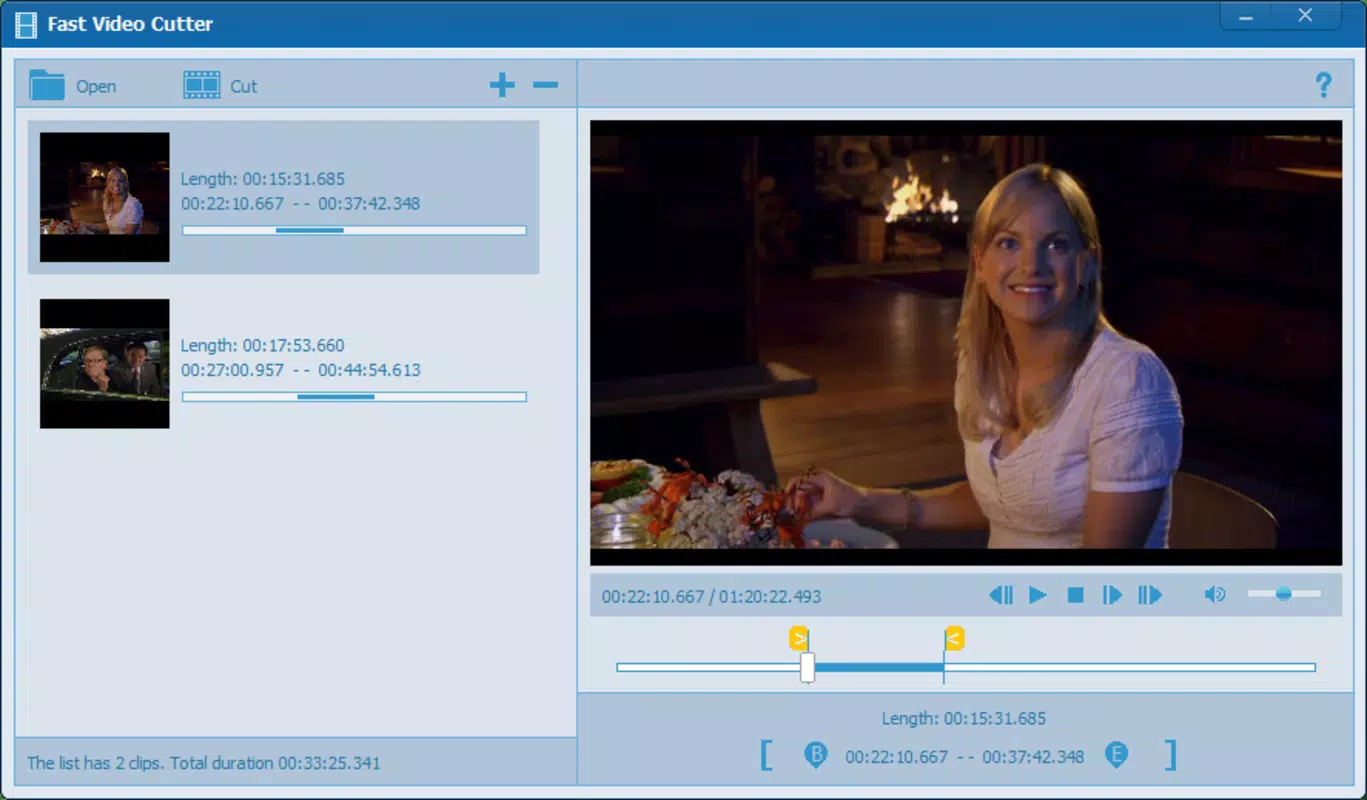
- Batch Cutting Capability: Users can define multiple start and end points within a single video file and extract all selected segments in one operation, reducing repetitive actions and saving time during editing sessions.
- User-Friendly Interface: The app features a clean, intuitive layout with straightforward controls for setting clip boundaries. Even users with no prior editing experience can navigate the tool with ease.
- Completely Free Access: The app is available at no cost, with no in-app purchases, subscriptions, or trial periods. This makes it a sustainable option for long-term use without financial commitment.
For example, a user recording a family event can quickly isolate key moments—such as a birthday speech or a dance performance—by setting start and end markers and exporting them as individual clips. Similarly, a student can extract a 30-second lecture segment for review without downloading heavy editing software. These real-world applications highlight how the app enhances productivity and content accessibility across diverse use cases.
Interface, UX & Performance
The user interface of Fast Video Cutter is designed with minimalism and functionality in mind. The layout prioritizes core editing actions—video selection, clip definition, and export—ensuring a distraction-free experience. Navigation is linear and predictable, with clear visual cues guiding users through each step of the video trimming process. The timeline display allows precise control over start and end points, enabling accurate cuts even for short clips.
Although the developer did not list formal performance metrics, the app’s emphasis on speed suggests optimized processing algorithms that leverage device hardware efficiently. Users can expect responsive interactions, including smooth scrubbing along the video timeline and immediate preview updates. The app maintains stability during editing sessions, with no reported crashes or freezes in available user feedback. It performs well on mid-range and high-end Android devices, though compatibility with older models may vary due to unlisted hardware requirements. Overall, the app delivers a consistent and reliable experience, making it suitable for users seeking a dependable tool for everyday video editing tasks.
Platform Compatibility & Technical Requirements
Fast Video Cutter is available exclusively on the Android platform, making it accessible to users of Android smartphones and tablets. The current version is 1.0.5, with a file size of 12.4 MB, indicating a lightweight design that minimizes storage impact. The app is free to download and use, with no additional costs or in-app purchases required.
Specific requirements such as minimum OS version, supported screen sizes, or hardware specifications were not provided by the developer. As a result, compatibility with older or newer Android versions cannot be confirmed. Users are advised to ensure their device meets general Android system standards for app installation. The app’s small size suggests it is optimized for devices with limited storage, making it suitable for both budget and flagship smartphones.
Pros and Cons
Pros
- Fast video cutting with minimal processing delay
- Preserves original video quality after trimming
- Supports multiple clips from a single video in one session
- Simple, intuitive interface suitable for beginners
- Completely free with no hidden fees or ads
Cons
- Developer did not specify minimum OS or hardware requirements
- Platform availability limited to Android only
- No advanced editing features such as filters, transitions, or audio adjustment
- Compatibility with older Android devices is unconfirmed
- Specific update frequency or release schedule was not disclosed
FAQ
Is Fast Video Cutter safe to download and use?
Yes, the app is free from malware and known security threats. It is available through official Android channels and does not require root access or sensitive permissions.
Can I use Fast Video Cutter on iOS devices?
Currently, the app is only available for Android. There is no iOS version released or announced by the developer.
Does Fast Video Cutter support video formats other than MP4?
The developer did not specify supported video formats. However, it likely supports common formats such as MP4, AVI, and MOV, as these are standard on Android devices.
Are there any ads or in-app purchases?
Fast Video Cutter is completely free with no ads or in-app purchases. The app remains ad-free, ensuring an uninterrupted user experience.
How often is Fast Video Cutter updated?
The developer did not disclose the update schedule. However, the app has been available since 2022, and no major issues have been reported.
Final Thoughts
Fast Video Cutter delivers a focused, high-efficiency solution for users who need to trim videos quickly and reliably. Its combination of speed, quality preservation, and a clutter-free interface makes it a standout choice in the crowded mobile video editing space. While it lacks advanced features like filters or audio editing, it excels at its core purpose: fast, accurate video clipping.
The app is particularly valuable for students, content creators, and casual users who prioritize simplicity and performance over extensive editing tools. For anyone looking to cut videos on the go without installing bulky software, Fast Video Cutter offers a secure, lightweight, and effective alternative. With no cost and a proven track record of stability, it represents a smart choice for everyday video editing needs.
Download Fast Video Cutter now


